

Custom scroll layouts with swipe actions in SwiftUI on iOS 27
Before iOS 27, swipeActions(edge:allowsFullSwipe:content:) only worked on rows inside a List. Applying it to views in a LazyVStack, a LazyVGrid, or a custom layout had no effect. iOS 27 removes that restriction with a new modifier, swipeActionsContainer(), that activates swipe action support for any container inside a scroll view.
We have to apply the new swipeActionsContainer() modifier directly to the ScrollView and then add swipeActions(edge:allowsFullSwipe:content:) to each row inside it.
struct TaskListView: View {
    @State private var tasks: [Task] = Task.samples

    var body: some View {
        ScrollView {
            LazyVStack {
                ForEach(tasks) { task in
                    TaskRow(task: task)
                        .swipeActions(edge: .leading) {
                            Button {
                                complete(task)
                            } label: {
                                Label("Complete", systemImage: "checkmark")
                            }
                            .tint(.green)
                        }
                        .swipeActions(edge: .trailing) {
                            Button(role: .destructive) {
                                delete(task)
                            } label: {
                                Label("Delete", systemImage: "trash")
                            }
                        }
                }
            }
        }
        .swipeActionsContainer()
    }

    func complete(_ task: Task) {
        guard let index = tasks.firstIndex(where: { $0.id == task.id })
        else { return }
        tasks[index].isCompleted = true
    }

    func delete(_ task: Task) {
        tasks.removeAll { $0.id == task.id }
    }
}
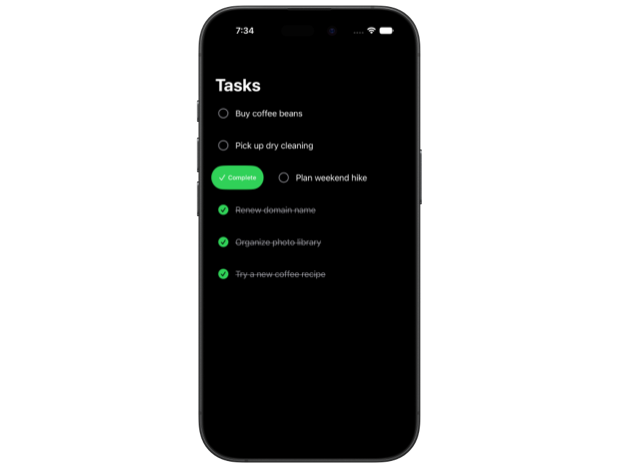
The swipeActionsContainer() modifier coordinates swipe behavior across the container: only one row's actions can be revealed at a time, scrolling dismisses any open actions, and tapping outside the active row does too.
Adding swipeActionsContainer() to a ScrollView also works with LazyVGrid and custom Layout types inside it, though whether swipe actions are appropriate depends on the specific layout and how items are presented.
In addition to the new container support, iOS 27 adds a new overload swipeActions(edge:allowsFullSwipe:content:onPresentationChanged:) that calls a closure whenever a row's actions are revealed or dismissed.
TaskRow(task: task)
    .swipeActions(edge: .trailing) {
        Button(role: .destructive) {
            delete(task)
        } label: {
            Label("Delete", systemImage: "trash")
        }
    } onPresentationChanged: { isPresented in
        // Keep track of which task has actions open
        activeTaskID = isPresented ? task.id : nil
    }
Both swipeActionsContainer() and the onPresentationChanged overload require iOS 27. Apps supporting earlier OS versions need to gate these APIs with #available.
If you are looking to build a strong foundation in SwiftUI, my book SwiftUI Fundamentals takes a deep dive into the framework's core principles and APIs to help you understand how it works under the hood and how to use it effectively in your projects. And my new book The SwiftUI Way helps you adopt recommended patterns, avoid common pitfalls, and use SwiftUI's native tools appropriately to work with the framework rather than against it.
For more resources on Swift and SwiftUI, check out my other books and book bundles.
Work with SwiftUI. Not against it.$35
A field guide to SwiftUI patterns and anti-patterns
The SwiftUI Way
- Avoid common SwiftUI pitfalls
- Build deeper intuition for the framework
- Gain insights from a former SwiftUI Engineer at Apple
Work with SwiftUI. Not against it.
A field guide to SwiftUI patterns and anti-patterns
The SwiftUI Way