

Nil Coalescing Newsletter - January 2026
Hi there,
We have almost made it through the first month of the year. I hope you managed to take some time off during the holiday season and that 2026 has started well for you.
I have not shared much content this month, as I was preparing my talk for iOS Conf SG and then Matt and I travelled to Singapore. It was a great experience. I really enjoyed meeting other iOS developers in person, talking about SwiftUI, answering questions, and making new connections.
I was also genuinely flattered by how many people told me they had read my Swift and SwiftUI books and shared such positive feedback. That support has given me a renewed sense of motivation and inspiration to keep writing and sharing more, which I fully intend to do this year.
In this issue of the newsletter, I want to share some insights from iOS Conf SG, including the main ideas from my own talk, as well as a few learnings from other talks at the conference. I hope you will find something useful and applicable to your own work.
The conference talks were recorded, so it's worth subscribing to the iOS Conf SG YouTube channel while we wait for the recordings to be released.
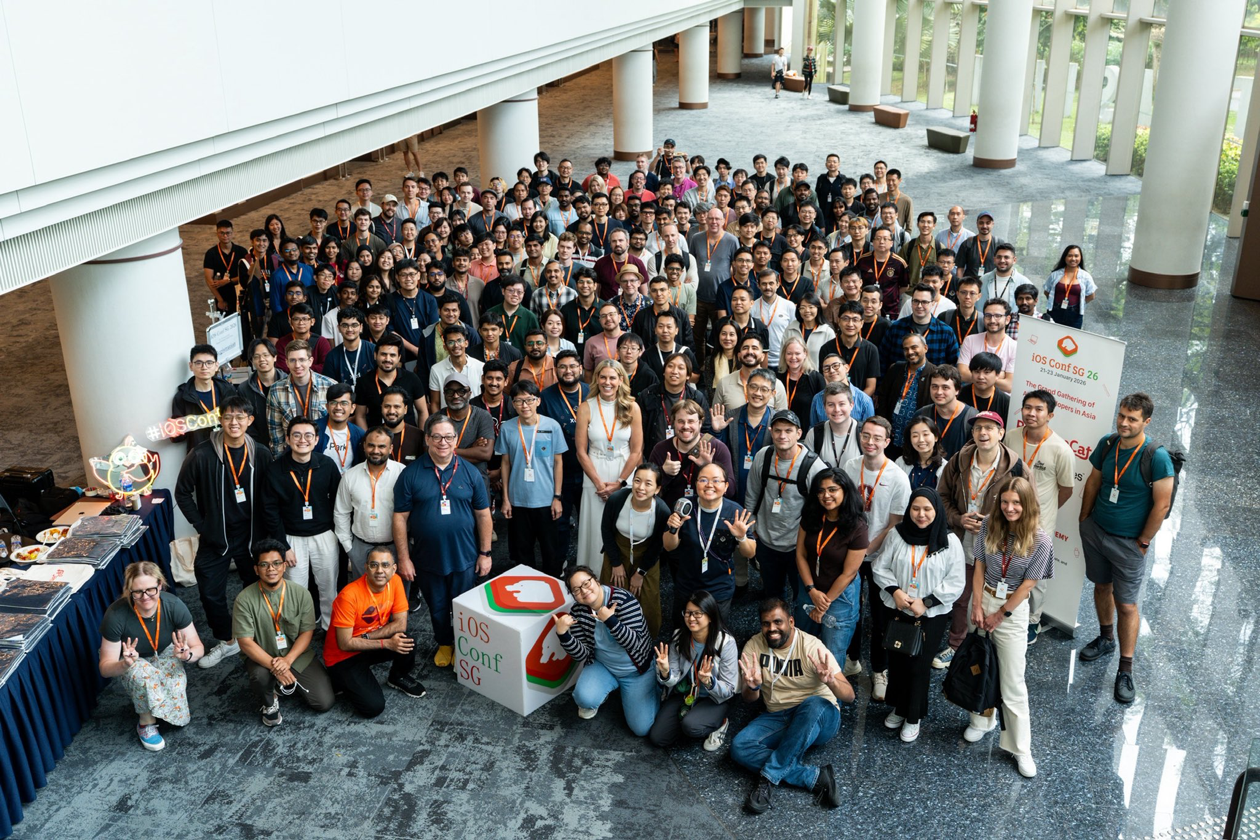
Group photo of speakers, organizers and attendees gathered at iOS Conf SG
The SwiftUI Mindset: 5 Key Ideas to Avoid Common Pitfalls
My talk focused on building a SwiftUI mindset and developing an intuition for how the framework works, structured around five key ideas. Keeping these ideas in mind helps avoid common frustrations such as slow compilation times, performance issues in larger projects, unnecessary view updates, and redundant data loading.
- A strong SwiftUI foundation starts with a compositional mindset and defining small, lightweight, reusable views. SwiftUI is optimized for composition. When view hierarchies are not broken down, large portions of the UI may update more often than necessary, negatively impacting performance. Splitting larger view bodies into smaller view structs improves readability and maintainability, and gives SwiftUI more opportunities to apply its built in optimizations.
- Equally important is isolating and minimizing view data dependencies. SwiftUI view updates are data driven. By passing only the data a view actually needs, updates are scoped to the parts of the UI that truly depend on the changed data. For reference types, using the
@Observablemacro instead of theObservableObjectprotocol enables more granular updates and further reduces unnecessary re-rendering.
- Another key aspect is ensuring that view values are easy to diff. SwiftUI determines whether a view needs to update by comparing the previous and new view values, including stored properties and dynamic property values. While the framework tries to minimize view body re-evaluation, it cannot reliably compare certain values, such as closures. Passing closures into views can therefore cause SwiftUI to treat the view as changed more often than expected. Where possible, code should be structured to avoid storing closures in views. If that is not feasible, custom diffing logic can be introduced by conforming the view to
Equatableand wrapping it in anEquatableView.
- It also helps to keep view initialization as cheap as possible. View initializers should be limited to simple property assignment, as SwiftUI creates and discards view values frequently throughout the view lifecycle.
- Finally, long term correctness and performance depend on keeping view identity stable. Stable identity allows SwiftUI to correctly match views across updates, preserve view state, and apply animations reliably. SwiftUI uses two kinds of view identity: structural and explicit. Structural identity is implicitly assigned based on a view’s type and position in the hierarchy, while explicit identity is most commonly used in dynamic collections such as
ListandForEach. To keep structural identity stable, avoid if-else branches when the goal is simply to change a view's state or appearance, and move conditional logic into view modifiers instead. For explicit identity, avoid unstable identifiers such as item indices and prefer stable, data backed IDs.
I hope the video of my talk will be available soon, so you can see more examples of these ideas in practice, and what can go wrong when they are overlooked.
You can also learn more about the inner workings of SwiftUI, including more detailed explanations of the view lifecycle, view identity, data flow, and other important aspects of the framework, in my book SwiftUI Fundamentals.
iOS Conf SG highlights
Write faster, smarter Swift
On the first day of the conference, Paul Hudson ran a very practical workshop focused on the Swift Algorithms, Async Algorithms, and Collections packages, showing how they can help solve common Swift problems in cleaner and more efficient ways.
One recurring theme was working with sequences without creating unnecessary intermediate collections. For example, chain(_:_:) lets us iterate over multiple collections as a single sequence by tying their iterators together, instead of allocating a new array.
import Algorithms

for name in chain(
    ["Jane", "Mary"],
    ["Daphne", "Eloise"]
) {
    print(name)
}
Another small but useful utility is compacted(), which removes nil values without requiring a transforming closure. This is a clearer alternative to compactMap { $0 } when no transformation is needed.
let values: [Int?] = [
    1, nil, 3, nil
]

let result = values.compacted()
The chunked APIs make it easy to group data without losing ordering, which is often preferable to using a dictionary. chunked(by:) groups consecutive elements together as long as they pass a binary predicate, while chunks(ofCount:) breaks a collection into fixed-size groups.
let values = [1, 1, 2, 2, 3, 3]

let chunks = values.chunked(by: ==)
Paul also demonstrated how merge() from Async Algorithms can process multiple async sequences together, emitting values as they arrive.
import AsyncAlgorithms

for await value in merge(
    streamA, streamB
) {
    print(value)
}
He closed with a reminder to choose appropriate data structures, such as using Deque from Swift Collections instead of Array for queue like behavior.
import Collections

var queue = Deque(["Order1", "Order2"])

queue.prepend("PriorityOrder")
let next = queue.popFirst()
Overall, the workshop highlighted how these packages provide small, focused APIs that replace manual looping and bookkeeping with clearer, more expressive Swift code.
Game Development in SwiftUI
Another interesting perspective at iOS Conf SG came from Kaylee Calderolla, who explored how games can be built using Swift and SwiftUI, and why that can be a good idea for certain types of games.
Kaylee demonstrated using Canvas for custom drawing and highlighted the use of symbols as an optimization. Instead of recreating the same view or image multiple times, symbols allow SwiftUI to resolve a view once and efficiently draw it many times. This can significantly reduce overhead when rendering large numbers of identical game entities.
TimelineView(.animation) { timeline in
    Canvas { context, _ in
        if let symbol = context.resolveSymbol(
            id: 0
        ) {
            for vampire in game.vampires {
                context.draw(
                    symbol,
                    at: vampire.position
                )
            }
        }
    }
    game.update(date: timeline.date)
} symbols: {
    Image(.vampire).tag(0)
}
Randomness featured in several examples, with a focus on using Swift’s built in randomness APIs and RandomNumberGenerator to keep behavior controllable and, when needed, repeatable.
The talk focused on a deliberately constrained approach: no external game engine, pure Swift, and SwiftUI where it fits best. The takeaway was that constraints can be a strength, and that SwiftUI can be a productive environment for UI driven and puzzle style games.
Accessibility That Engineers Actually Love to Build
Jessi Febria covered the important topic of accessibility and walked through gradually adding accessibility support to an iOS app. The talk was grounded in practical steps, starting with the newly introduced Accessibility Nutrition Labels and using them as a guide for identifying gaps and prioritizing improvements.
Rather than treating accessibility as an all or nothing effort, Jessi showed how to approach it incrementally and make steady progress. This makes accessibility work more approachable and easier to fit into an existing codebase.
A large focus of the talk was improving navigation with VoiceOver and Voice Control. Jessi demonstrated how grouping related UI elements using the accessibilityChildren(children:) API and applying sort priority correctly can significantly improve the experience for users navigating the app without sight or touch.
She also highlighted using the Accessibility Inspector to audit color contrast. The Inspector can automatically flag insufficient contrast across an entire screen, highlight the affected elements in the running app, and show how the current contrast ratio compares to recommended targets. This makes it much easier to catch and fix contrast issues early, rather than relying on manual checks.
The overall message was that accessibility does not need to be complex or burdensome. With the right mental model and a few well placed changes, it becomes a natural part of building high quality iOS apps rather than a separate concern.
Thank you for following along. I hope you found something useful in the highlights I shared.
Next month, I will be attending the ARCtic Conference in Finland, where I will be giving a new talk on lesser known Swift language features and techniques. Maybe I will see you there?
Discounts
Every month, I share exclusive, limited-time offers on my books with email newsletter subscribers. Sign up so you don’t miss future newsletter issues and can take advantage of upcoming discounts!