

Nil Coalescing Newsletter – September 2026
Hi there,
September took us a long way from home! Matt and I traveled from New Zealand to Wales for iOSDevUK, where we both presented and had a lovely time catching up with the community. I'll share a few highlights from the trip below.
We also released SwiftFairy, our new Mac app that helps coding agents review Swift and SwiftUI code. I'm excited to introduce it to you, along with this month's articles. Let's start there!
SwiftFairy: our Swift and SwiftUI expertise for your coding agent
Over the past year, Matt and I have been working on ways to make the knowledge from our books, articles, and development experience useful to coding agents. One difficulty we kept running into was that giving an agent the right information doesn't mean it will apply it when needed. Instructions can get lost in a long conversation, and agents don't always go back to read the relevant guidance on their own.
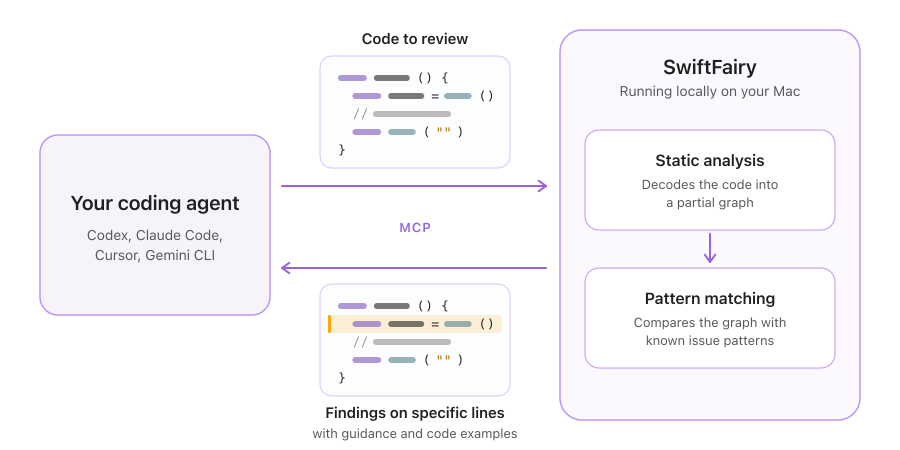
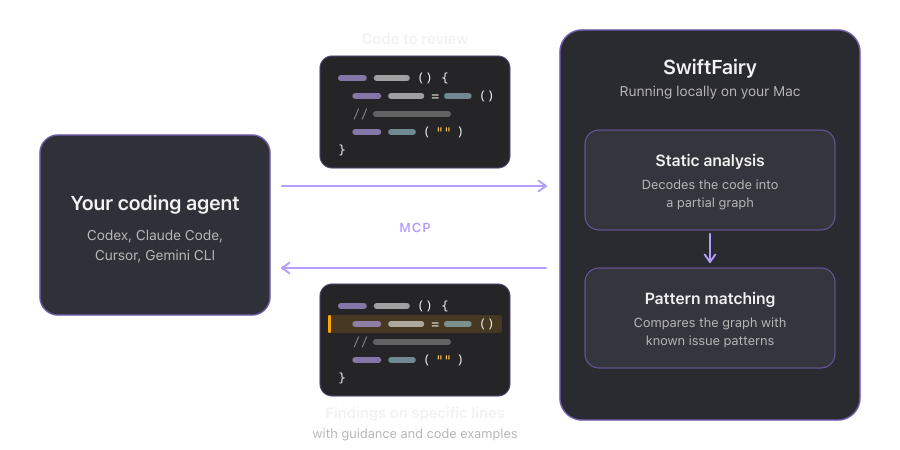
That led us to build SwiftFairy, a native Mac app that reviews Swift and SwiftUI code locally and gives your coding agent guidance where it finds a potential issue. Your agent sends code to SwiftFairy through MCP, and the app uses static analysis to match its structure against patterns we know can cause problems. Each finding is attached to the relevant code and includes an explanation and examples of how to address it.
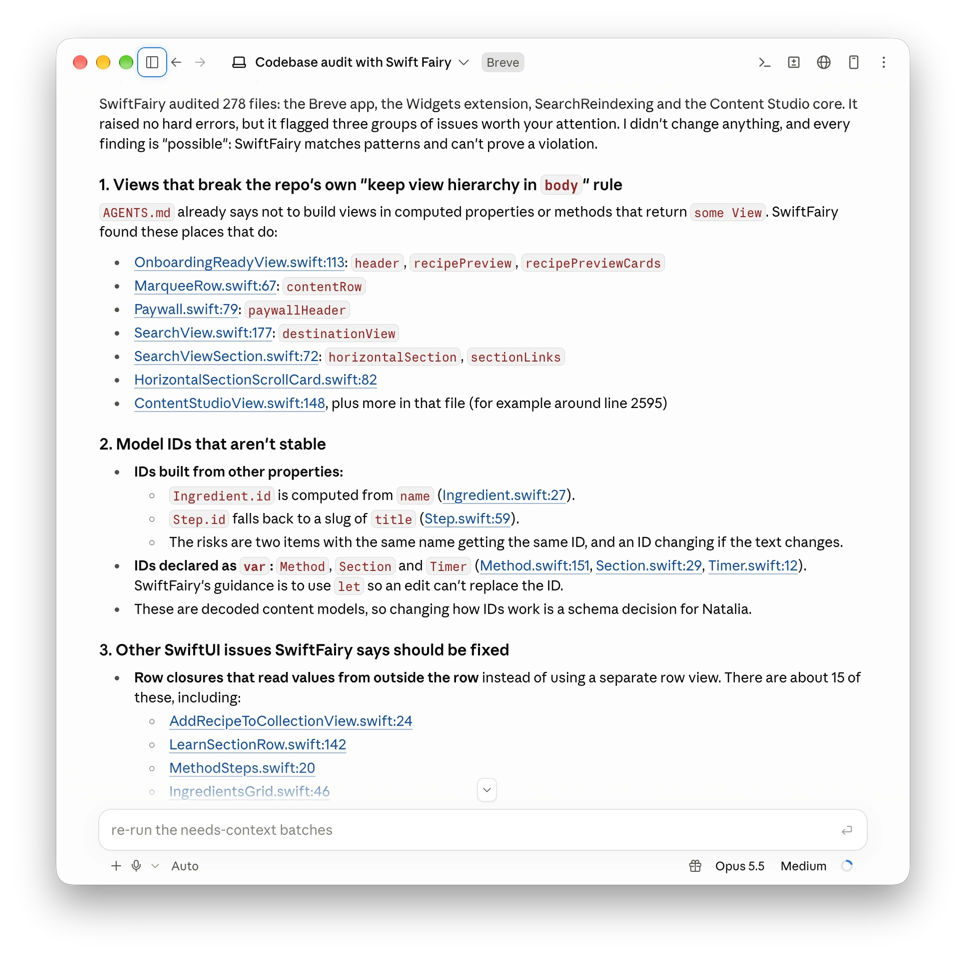
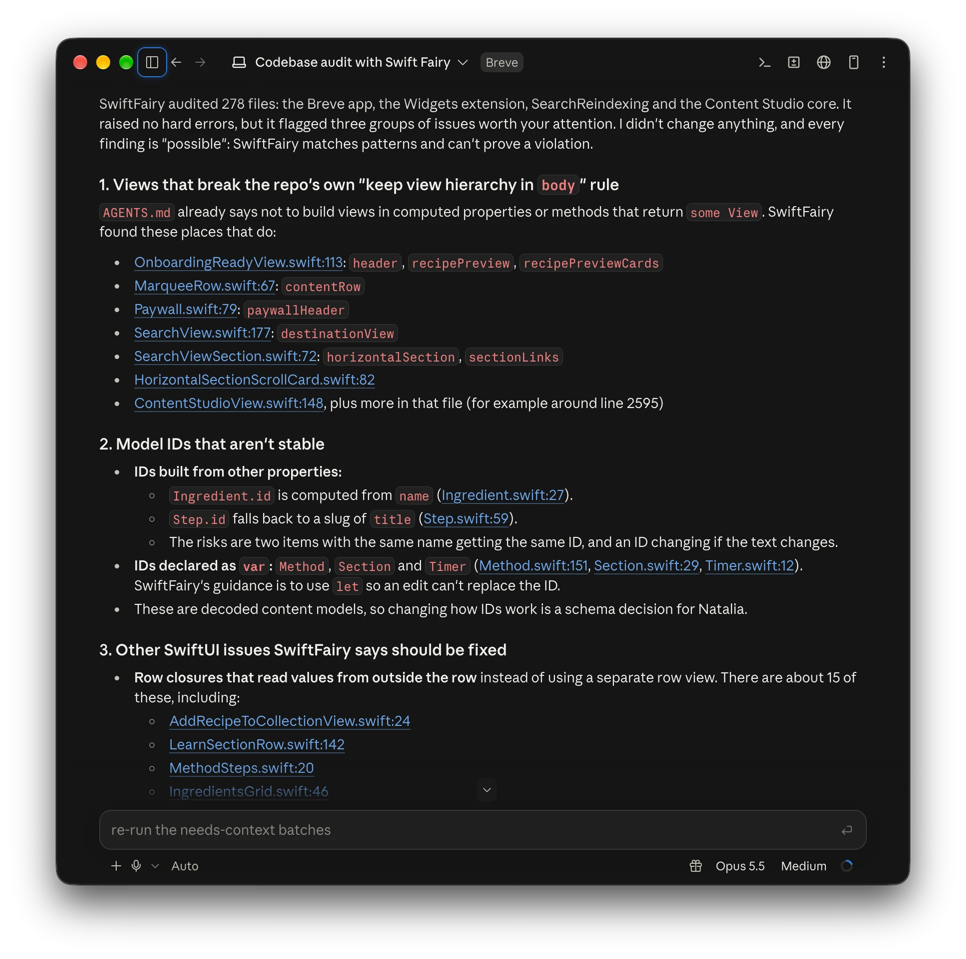
We saw a good example of why this matters while reviewing our coffee app, Breve. SwiftFairy flagged views built in computed properties or methods returning some View, and the agent pointed out that its own AGENTS.md already contained instructions against that pattern. Having the rule available hadn't been enough to prevent it from appearing in the code.
SwiftFairy's checks are deterministic: they look for structural patterns in the code and return the guidance associated with a match. This gives the agent a concrete issue to work on, with the relevant knowledge right there. It also reduces how much reference material needs to occupy the agent's context, because explanations are supplied where issues are found.
SwiftFairy checks for many potential issues across your codebase. As an example, here's a SwiftUI performance pitfall it can flag: a ForEach that produces a variable number of rows per element inside a List.
List {
    ForEach(walks) { walk in
        Text(walk.name)
        if walk.isShort {
            Text("Short walk")
        }
    }
}
Each walk contributes either one or two rows, depending on isShort. To determine the rows, SwiftUI has to evaluate the content for every walk upfront, including those that are offscreen. This extra work can make large lists slower to display.
SwiftFairy can detect this structure even when the conditional content is inside a Group or a child view, where it may be less obvious from reading the ForEach itself. It then gives the agent an explanation of the performance issue and guidance on how to address it.
We organize the guidance into collections called Scrolls, each covering related APIs or a development domain. The initial release includes Proper SwiftUI, Performant Swift Charts, and Modern Swift. We'll continue expanding these and adding Scrolls for areas such as layout and accessibility.
Matt explains the approach in more detail in his introduction to SwiftFairy, with examples of the findings and how the analysis works. If you'd like to try it on your own project, you can download SwiftFairy and ask your coding agent to review your codebase. The app includes 24 hours of free access, with no card details required.
iOSDevUK
Earlier in the month, we had a chance to share some of our work in person at iOSDevUK. After speaking remotely twice in previous years, I finally got to attend in Aberystwyth. We really enjoyed spending a few days with the community and learning from the other speakers.
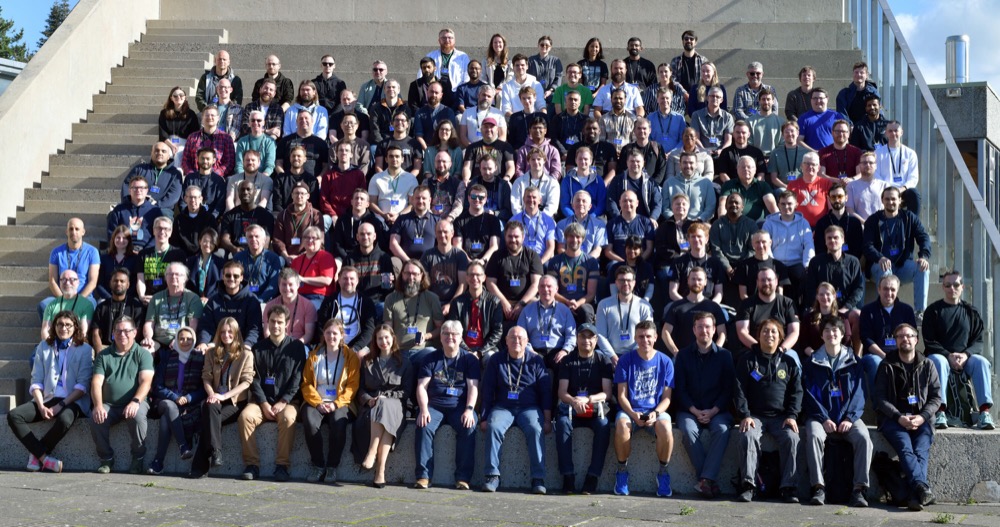
Speakers and attendees at iOSDevUK in Aberystwyth
Matt gave his first talk at an iOS conference, "No More Jitter: Optimising interactive Swift Charts for large datasets". A central idea was to keep the chart in a dedicated view whose body only needs to run when its chart content changes. Updating an unrelated control elsewhere on the screen shouldn't cause a complex chart to be rebuilt.
He showed how custom ViewModifier types can read changing values from the environment and apply chart modifiers, keeping those dependencies out of the body that hosts the chart. For example, a color theme can update through chartForegroundStyleScale instead of changing styles inside the chart content. Selection effects can similarly be handled where they are displayed, avoiding unnecessary reevaluation of the marks.
He also covered a subtle scrolling issue: changing how much time a chart displays can cause the framework to choose a new scroll offset. By explicitly managing the scroll-position binding alongside the visible duration, we can keep control of the position as that duration changes.
These techniques are part of what we explore in Swift Charts Beyond the Basics, especially the chapters on scoping chart updates and coordinating selection and scrolling. If you're adding interaction to a chart and finding that it becomes less responsive, those chapters explain how to keep frequent changes from triggering more work than necessary.
The same question of what causes a view to update was central to my workshop, "Mastering SwiftUI Data Flow and Avoiding View Update Pitfalls". It was my first workshop at an in-person conference, and I really enjoyed the thoughtful questions and discussions. Participants found the distinction between a view value and its identity particularly useful: SwiftUI can create new view values while preserving the same identity and its existing state.
That distinction has a practical consequence for loading data. Assigning a model to @State in a view's initializer only supplies the initial value for its storage; it doesn't replace existing state when an input changes. Initializers also run frequently, so they should stay inexpensive. Here's the approach we used to load extracted colors for the selected image in the Palette Library exercise:
private struct PaletteExtractionView: View {
    let image: InspirationImage
    @Binding var colors: [PaletteColor]
    @State private var model: PaletteExtractionModel?

    var body: some View {
        Image(image.resourceName)
            // Other image modifiers omitted.
            .task(id: image) {
                model = PaletteExtractionModel(image: image)
                await model?.load()
            }
        // Extraction results and color selection omitted.
    }
}
The task runs when the view appears and restarts when image changes, updating the model for the new input. For lightweight synchronous updates, onChange(of:initial:) with initial: true serves a similar purpose: it runs initially and when the observed value changes. Choosing between them depends on whether the work is asynchronous or synchronous.
While preparing the workshop, I kept referring back to both of my SwiftUI books. If you'd like to explore these ideas further, SwiftUI Fundamentals explains view values, identity, and the data flow system, while The SwiftUI Way builds on those foundations with practical guidance on modeling dependencies, initializing data, and avoiding unnecessary view updates.
A big thank you to the organizers for bringing everyone together and making iOSDevUK such a welcoming conference!
Blog updates
Visualising data with a hexagonal heatmap in Swift Charts
Explore alternatives to rectangular heatmap cells for visualising spatial data along coastlines and irregular boundaries.
Adjusting the hinge angle in the iPhone Duo simulator
Holding the Option key reveals the hinge angle slider in the iPhone Duo simulator in Xcode 27.1, letting us adjust how far the simulated device is open.
Configuring SwiftUI toolbars on iPhone Duo
Control how SwiftUI presents toolbar items and tabs on iPhone Duo with the new iOS 27.1 APIs, from arranging custom labels to prioritizing actions when space is limited.
Diagnosing ForEach performance issues in SwiftUI lazy containers
Learn how to enable SwiftUI's ForEach slow-path diagnostic in Xcode, interpret warnings about variable view counts, and address the reported patterns in List and lazy stacks.
Building a sunburst diagram in Swift Charts
Present grouped data as a multi-level donut chart, where each outer ring reveals a more detailed breakdown and each subgroup aligns with its parent category.
SwiftUI data dependencies and their effect on view updates
Compare the effects of stored inputs, state, bindings, environment values and observable models on SwiftUI view updates through input comparison, access tracking and subscription behavior.
Building an accessible calendar chart with Swift Charts
Learn how to organize daily data into a calendar-style visualization and provide a meaningful VoiceOver experience that clearly communicates each date and its value.
Discounts
Every month, I share exclusive, limited-time offers on my books with email newsletter subscribers. Sign up so you don't miss future newsletter issues and can take advantage of upcoming discounts!