

Nil Coalescing Newsletter – November 2026
Hi there,
It's hard to believe we're already approaching the end of the year and it's time for the annual Black Friday sales in our developer community! This year, we have a lot to offer at Nil Coalescing, including our Swift and SwiftUI books, our code review tool for coding agents, SwiftFairy, and my new app for reading technical EPUBs and PDFs, Whio.
The newsletter is out a little earlier than usual this month to make sure you have enough time to take advantage of our sale if you'd like to.
I also have some updates to share about our apps and tools, along with the latest articles Matt and I have published on SwiftUI and Swift Charts.
Black Friday at Nil Coalescing
Our Black Friday sale is running until December 2, with 30% off our books, SwiftFairy and Whio Unlimited. I've put together a dedicated page on our website where you can find all the offers and details on how to redeem them.
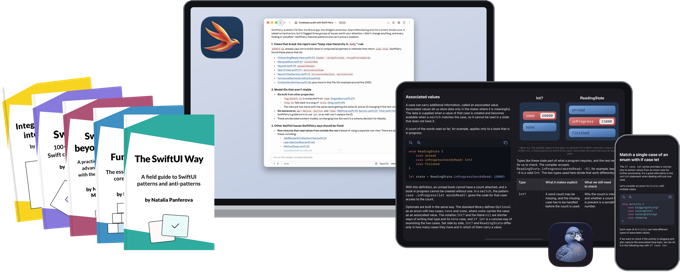
Our Swift and SwiftUI books, SwiftFairy on Mac, and Whio on iPad and iPhone
- Swift and SwiftUI books: 30% off all our books and bundles, including custom bundles, where you can save an additional $5 per book. The Black Friday discount is applied automatically at checkout.
- SwiftFairy: 30% off all Scrolls, bundles and plans. If you haven't tried SwiftFairy yet, you can also try each Scroll for free for a day.
- Whio Unlimited: 30% off both the yearly subscription and the lifetime purchase. You can redeem the offer directly in the app using the code BF2026YEARLY or BF2026LIFETIME, respectively.
This is our biggest sale of the year, so if you've been considering any of our products, now is a great time to get them.
What's new in SwiftFairy
Matt has been doing a lot of work on the analysis engine behind SwiftFairy this month, both to improve its performance and to give coding agents a deeper understanding of Swift and SwiftUI projects.
In addition to identifying potential issues in the code, SwiftFairy now provides agents with tools to investigate their underlying causes. This is particularly useful in SwiftUI, where understanding the relationships between views, their dependencies and the surrounding view hierarchy can be important when addressing issues with view updates and layout.
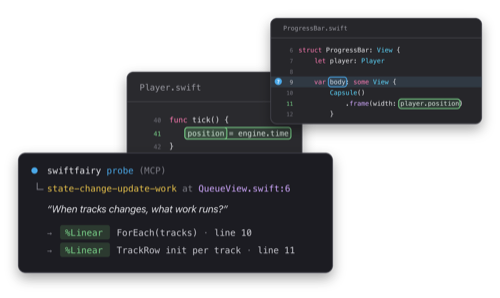
The SwiftFairy probe tool tracing which work runs when a state value changes
We've also made significant performance improvements, with audits now running up to 100 times faster on larger projects, and continued to expand the rules across our Scrolls. This includes new checks for the use of layout priority in SwiftUI and 52 new rules in the Modern Swift Scroll covering the choice of data types.
You can find more details about these improvements in the SwiftFairy release notes.
Improvements to Whio
Since releasing Whio last month, I've been focusing on improving the way it handles technical PDFs. Unlike traditional PDF readers, Whio extracts and reflows the content of a PDF so that users can adjust the typography and colour scheme to suit their reading preferences.
Technical PDFs vary a lot in how they're put together, and more complex content often needs extra attention. I've made a number of improvements to the extraction and rendering of tables, mathematical formulas, code examples, lists, indexes and image captions. I've also added the system Look Up and Translate actions for selected and highlighted text.
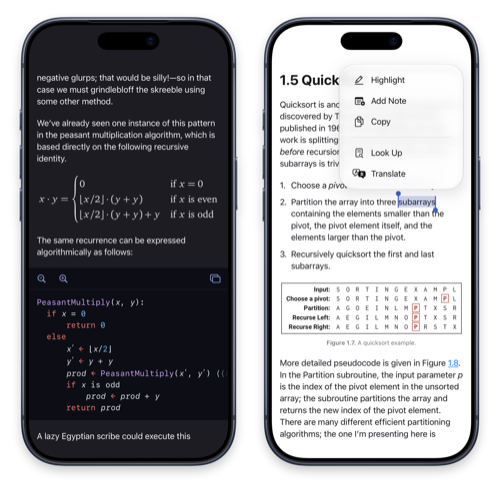
Jeff Erickson's Algorithms PDF (CC BY 4.0), reflowed in Whio
It was particularly nice to see Whio featured in issue #776 of iOS Dev Weekly this month. Alex Ozun tried reading technical books from his own library in Whio and shared his impressions of the rendering quality and reading accessibility features.
App Store featuring and editorial nominations
You might remember from last month's newsletter that my coffee app, Breve, was selected as App of the Day in the US. This month, it was lovely to see it receive the same feature in Australia and New Zealand. A few people have asked me if I've been doing anything differently to get my app featured, so I thought I'd share my experience here.
I haven't had much luck getting my apps featured in the past, but during WWDC this year, I booked an online appointment with the App Store editorial team. I had the opportunity to show them Breve and ask some questions about featuring. They really liked the look of the app and thought it had good potential for editorial coverage. They encouraged me to start submitting featuring nominations through App Store Connect for significant app updates and in-app events, and to do so as early as possible, giving the team at least three weeks' notice, but preferably more.
I've been following their advice since WWDC, and Breve has received several features across different regions, which have made a significant difference to both downloads and subscriptions.
Although we can't nominate our apps specifically for App of the Day, submitting nominations for updates and in-app events can help bring our apps to the attention of the editorial team and potentially lead to other featuring opportunities.
A little while ago, the editorial team reached out to me with some questions about Breve and put together a lovely story about the app, which accompanied both of its App of the Day features.
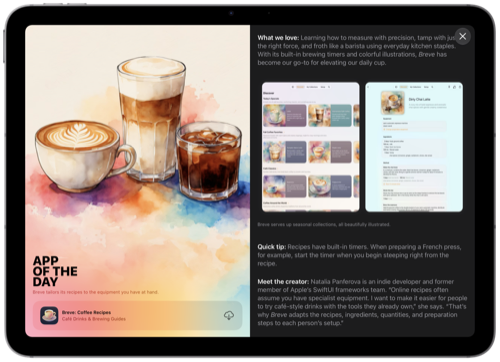
The App Store editorial story about Breve for its App of the Day feature
Based on my experience with Breve, I think it's well worth taking the time to submit featuring nominations whenever we have something new to share about our apps.
New blog posts this month
I've been writing more about SwiftUI layout this month, looking at how layout priority and ideal sizes affect the way containers arrange their content. I've also explored the different APIs for building scroll-driven effects and custom container views, and Matt has written a new article on making charts more accessible.
Distinctive patterns for categorical data in Swift Charts
Make categorical data easier to distinguish without relying on color alone by programmatically drawing repeating patterns and creating custom shape styles that respond to the Differentiate Without Color accessibility setting.
Custom container views in SwiftUI
Learn how to build custom containers that work with individual subviews and sections, and use container values to let callers customize how individual views are presented.
Scroll-driven effects in SwiftUI: phases, geometry and scroll state
Explore the differences between scrollTransition(), visualEffect(), onScrollGeometryChange() and onScrollVisibilityChange(), and learn when to use each API to drive visual effects, interface updates and actions in response to scrolling.
The effect of fixedSize() on view sizing and layout in SwiftUI
Understand how fixedSize() modifies size proposals, how views respond with their ideal sizes, and why applying this modifier to different types of views can produce very different layout results.
The role of layout priority in SwiftUI containers
Explore how different SwiftUI containers interpret layout priority, from allocating space in horizontal and vertical stacks to determining the size of a ZStack and using layout priority in custom Layout implementations.
Discounts
Our Black Friday sale this month is open to everyone, but I also share exclusive, limited-time offers with email newsletter subscribers throughout the year. Sign up so you don't miss future newsletter issues and can take advantage of upcoming discounts!