

Embedding SF Symbols in SwiftUI Text
When we need to combine text with an icon in SwiftUI for a button label or a list row title, using the Label view is the standard approach. But in some cases, we may need more control over where the icon is placed, for example, if we want to insert it within a string.

The most straightforward way to achieve this in SwiftUI is to interpolate an Image view inside the string literal passed to Text.
Text("Watch your gear! The kea \(Image(systemName: "bird")) are known to steal anything shiny.")
This approach only works with a string literal, not a string variable, because a literal in that case gets automatically converted into a LocalizedStringKey, which supports Image view interpolation. Under the hood, the init(_:tableName:bundle:comment:) method is called to initialize a Text view, where the LocalizedStringKey is in turn created using the init(stringInterpolation:) method.
If we do need to define our string with an image outside of the Text view, we can initialize it as a LocalizedStringKey first and then pass it into Text.
struct ContentView: View {
    private let key: LocalizedStringKey = """
    Watch your gear! The kea \(
        Image(systemName: "bird")
    ) are known to steal anything shiny.
    """

    var body: some View {
        Text(key)
    }
}
It's important to note that images interpolated inside a LocalizedStringKey don't support styling modifiers. This is because modifiers applied to Image return some View, not an Image, and LocalizedStringKey interpolation doesn't support arbitrary view interpolation and will fallback to displaying a debug description for the value.
private let key: LocalizedStringKey = """
Watch your gear! The kea \(
    Image(systemName: "bird").foregroundStyle(.green)
) are known to steal anything shiny.
"""
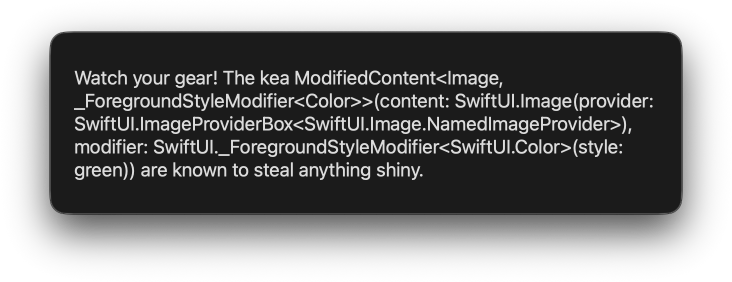
To add extra styling to interpolated images, we have to wrap them inside another Text view first.
private let key: LocalizedStringKey = """
Watch your gear! The kea \(
    Text(Image(systemName: "bird")).foregroundStyle(.green)
) are known to steal anything shiny.
"""
This is a little verbose, but it works.

Unfortunately, SwiftUI doesn't support adding symbol images into text via the AttributedString API, which would enable a more dynamic insertion method.
If you are looking to build a strong foundation in SwiftUI, my book SwiftUI Fundamentals takes a deep dive into the framework's core principles and APIs to help you understand how it works under the hood and how to use it effectively in your projects. And my new book The SwiftUI Way helps you adopt recommended patterns, avoid common pitfalls, and use SwiftUI's native tools appropriately to work with the framework rather than against it.
For more resources on Swift and SwiftUI, check out my other books and book bundles.


Work with SwiftUI. Not against it.$35
A field guide to SwiftUI patterns and anti-patterns
The SwiftUI Way
- Avoid common SwiftUI pitfalls
- Build deeper intuition for the framework
- Gain insights from a former SwiftUI Engineer at Apple
Work with SwiftUI. Not against it.
A field guide to SwiftUI patterns and anti-patterns
The SwiftUI Way