

Nil Coalescing Newsletter – June 2026
Hi there,
I hope you enjoyed WWDC26, whether you were attending in person or following along online.
The most exciting update this year has definitely been the new and improved Siri, which I already had a chance to experiment with. But we've also got a lot of smaller updates and improvements across all the platforms and frameworks we use every day, and that's always welcome.
I've been digging into all the SwiftUI updates while preparing for my presentation at /dev/world on tour, which is coming up next week. I'm really looking forward to this conference. As far as I know, it's the first event of its kind in our part of the world, focused entirely on the WWDC announcements and giving everyone a chance to dive deeper into everything Apple introduced this year.
Matt and I are heading to Sydney on Wednesday. We'll spend a few days at the conference, catch up with friends from the community, meet some new people, and hopefully have a bit of time to explore the city as well. If you're attending, come and say hi!
New blogs posts this month
AsyncImage improvements in iOS 27
iOS 27 gives AsyncImage more control over remote image loading with URLRequest support for custom headers, cache policies, and timeouts, plus the ability to provide a custom URLSession across a SwiftUI view hierarchy.
New SwiftUI APIs for reordering and drag and drop on iOS 27
Reorder items within and between custom SwiftUI containers, and build selection-aware multi-item drag and drop interactions with the new APIs in iOS 27.
Navigation transition updates in SwiftUI on iOS 27
SwiftUI now includes CrossFadeNavigationTransition, a built-in cross-fade navigation transition, and AnyNavigationTransition, a type-erased wrapper that allows transitions to be selected dynamically at runtime.
Custom scroll layouts with swipe actions in SwiftUI on iOS 27
iOS 27 extends support for swipe actions beyond List to any scroll container using the new swipeActionsContainer() modifier.
Initializing @Observable classes with the @State macro in Xcode 27
SwiftUI's @State changes from a property wrapper to a macro in Xcode 27, gaining lazy evaluation of the initial value and fixing unnecessary @Observable model initialization on view recreation.
Styling measurement unit fonts in SwiftUI
Use the AttributedString API to build a reusable Text initializer that applies a distinct font to the unit component of a formatted measurement.
SwiftUI animation timing
Review the full range of animation timing options available in SwiftUI, including easing curves, spring animations, the CustomAnimation protocol, and animation modifiers.
Tinty: Mesh Gradient Editor
I'm very excited to share that I released a new macOS app this month, called Tintly, which is a native macOS tool for designing mesh gradients visually.
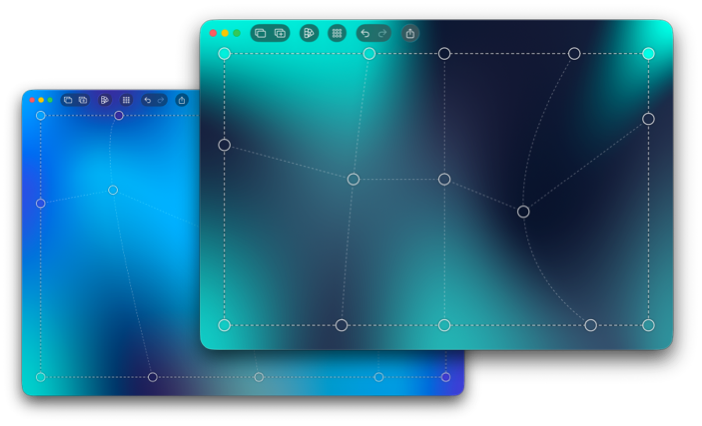
Screenshots of Tintly on macOS
Tintly is great for creating colorful backgrounds, wallpapers, UI visuals, app assets, landing page graphics, and creative design concepts. It lets you drop color pallets in any format and instantly convert them into beautiful mesh gradients.
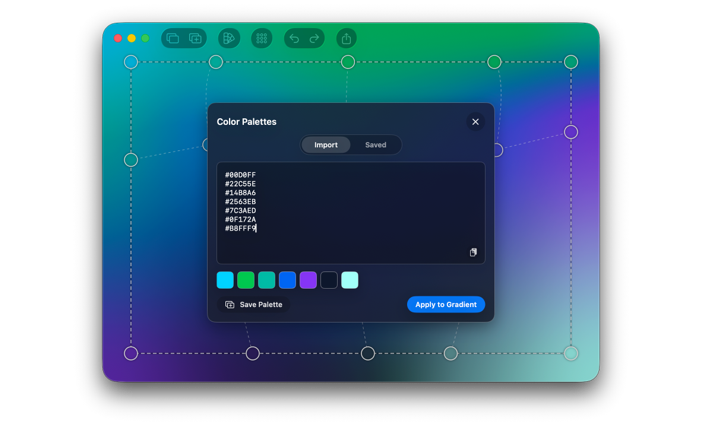
Palette import view in Tintly
You can also drag the control points around, adjust their colors, or add and remove rows and columns in an easy intuitive way right on the gradient canvas.
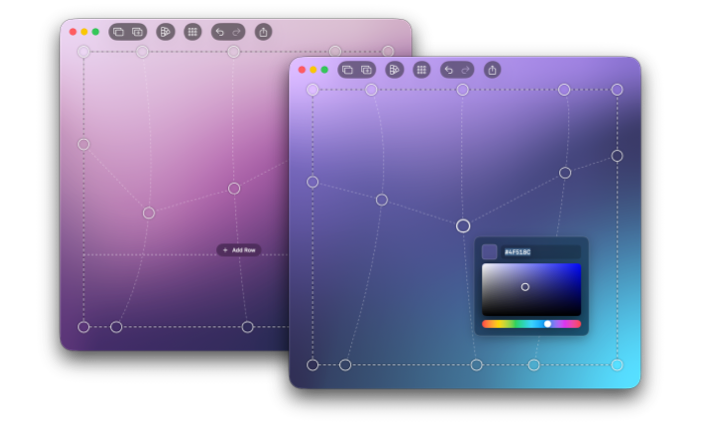
Adding rows and adjusting colors in Tintly
It supports many export formats, such as PNGs, JPEGs, SVGs, as well as CSS and SwiftUI code.
I'd love for you to give it a try. I have always wanted a tool like this, and couldn't find anything that worked well for me, so I built my own. I've already received a lot of great feedback regarding the design and the functionality of the app. I've also got a few nice suggestions for future additions, so I'm already planning the next release.
You can download Tintly from the Mac App Store: Tintly: Mesh Gradient Editor.
Breve v1.2
I also released an update to my iPhone and iPad app, Breve: Coffee Recipes. It now lets you add Home Screen widgets with daily coffee suggestions. You can configure the widgets to show drinks from a specific collection, like Cold & Iced, or let them suggest any coffee drink from the entire app.
Another feature I finally added is recipe sharing, so I can now easily ask Matt to make me whatever coffee I'm in the mood for 😁
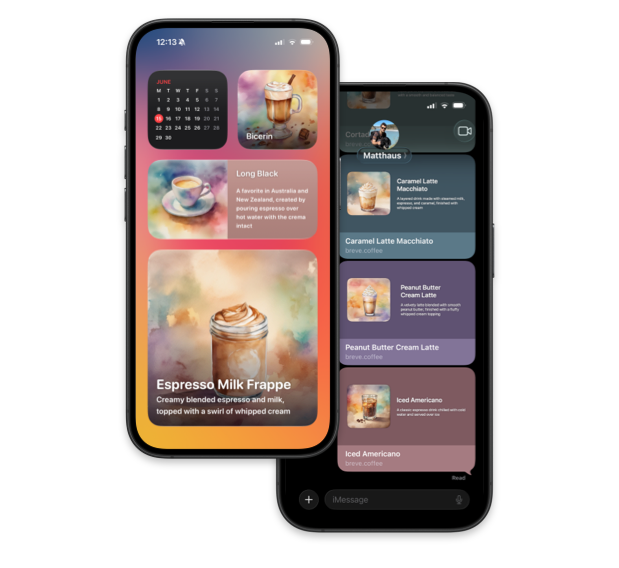
Breve Home Screen widgets and shared coffee recipes in Messages
I'll be running a special in-app event throughout July featuring refreshing iced coffee drinks, perfect for the hot days of the Northern Hemisphere summer.
If you want to check it out, you can find Breve on the App Store: Breve: Coffee Recipes.
Exsto v5.1
In the meantime, Matt has been working on an update to our drawing app Exsto, which is now live. Upon a very popular request, this update added support for rotating the canvas and adjusting the rotation of the symmetry guide independently.
abc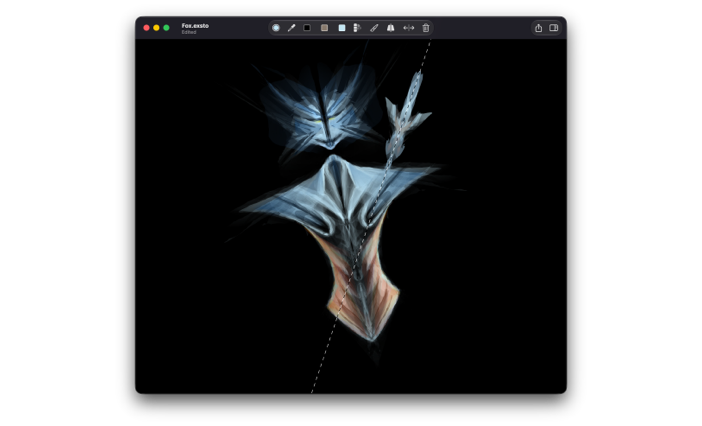
Rotated canvas and symmetry guide in Exsto
If you are curious, give it go! Exsto is designed for letting you experiment with making digital art in a relaxing non-precise way, and is fun to play with. It works on iPhone, iPad and Mac: Exsto - Relaxing Drawing.
Discounts
Every month, I share exclusive, limited-time offers on my books with email newsletter subscribers. Sign up so you don’t miss future newsletter issues and can take advantage of upcoming discounts!