

Initializing @Observable classes within the SwiftUI hierarchy
I've noticed that many iOS developers, even those who have been working with SwiftUI for a while, still have questions about how @Observable classes work with SwiftUI views, how they should be initialized, and whether we need to store our observable models in @State. In this post, we'll look at some examples of managing observable state in SwiftUI, explore the recommended approaches, and see what can go wrong if our observable classes are not stored correctly.
# Storing @Observable models in @State
When we initialize an @Observable class in a SwiftUI view and read its properties, SwiftUI will automatically refresh any views that depend on those properties when they change. This happens even if we simply assign the observable class to a stored property in the view struct. Because of this, it may not be immediately obvious why we need to bother with storing the model in @State.
In the following example, the text view will update as we increment the count property of DataModel.
@Observable
class DataModel {
    var count = 0
}

struct ContentView: View {
    private let dataModel: DataModel = DataModel()

    var body: some View {
        VStack {
            Text("Count: \(dataModel.count)")

            Button("Increment") {
                dataModel.count += 1
            }
            .buttonStyle(.borderedProminent)
        }
    }
}
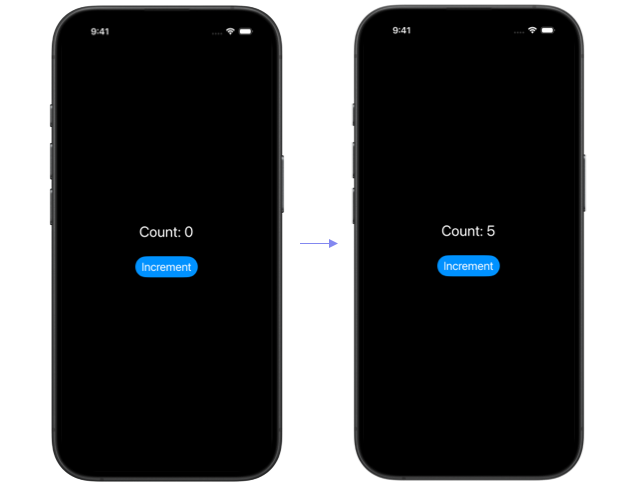
However, when an @Observable model is not stored in @State, it's not tied to the SwiftUI view lifecycle. A new instance will be created every time the view struct is initialized. In SwiftUI, view structs are ephemeral and only exist long enough to describe the view hierarchy. The actual views and their state are managed by SwiftUI in an internal data structure, so the lifetime of a view struct is not the same as the lifetime of the on screen view.
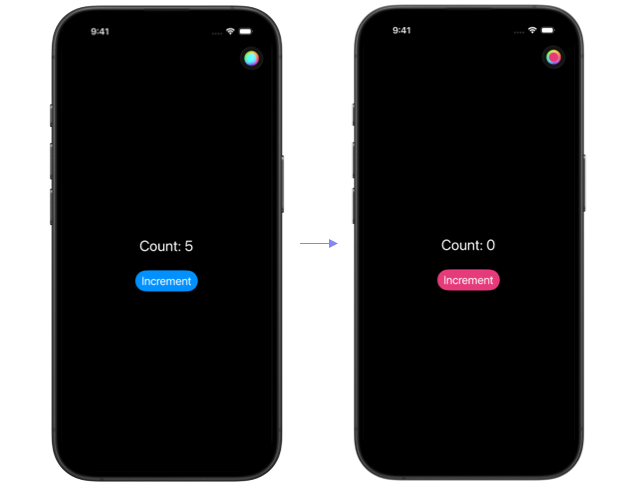
We can see the issue with not assigning the observable model to @State in the next example. Here we refactor the counter into a separate CountView and add a ColorPicker to ContentView, which controls the tint color of the app.
struct ContentView: View {
    @State private var tint: Color = Color.accentColor

    var body: some View {
        NavigationStack {
            CountView()
                .tint(tint)
                .toolbar {
                    ColorPicker("Tint Color", selection: $tint)
                        .labelsHidden()
                }
        }
    }
}

struct CountView: View {
    private let dataModel = DataModel()

    var body: some View {
        VStack {
            Text("Count: \(dataModel.count)")

            Button("Increment") {
                dataModel.count += 1
            }
            .buttonStyle(.borderedProminent)
        }
    }
}
Every time the tint color changes, ContentView's body is rebuilt, the CountView initializer runs again, and DataModel is recreated, losing its previous state.
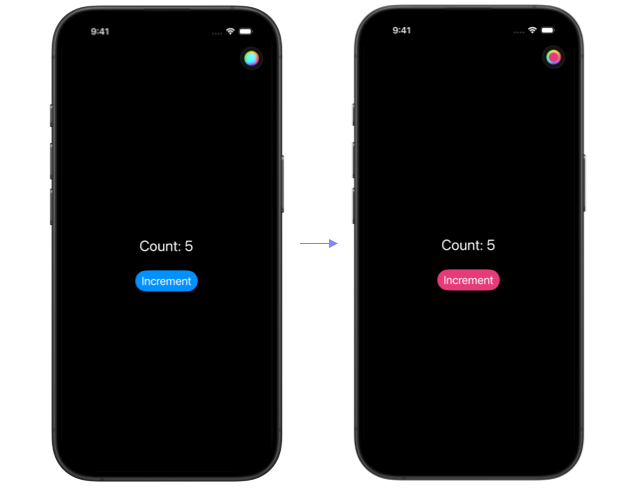
Simply changing the dataModel property in CountView from a stored let on the view struct to a variable annotated with @State fixes the issue. The @State annotation tells SwiftUI that this property is tied to the view lifecycle, so SwiftUI manages its storage on our behalf and keeps it alive while the view is present in the hierarchy.
struct CountView: View {
    @State private var dataModel = DataModel()

    var body: some View {
        VStack {
            Text("Count: \(dataModel.count)")

            Button("Increment") {
                dataModel.count += 1
            }
            .buttonStyle(.borderedProminent)
        }
    }
}
The state persists even though the view struct itself may be created and discarded many times during that period.
# Deferring Observable model initialization
There is a caveat to remember when deciding when and where to perform the observable class initialization. When using an Xcode version below Xcode 27, a model initialized as the default value of a state property will have its initializer code run every time the view initializer runs, creating a new temporary instance that SwiftUI immediately discards.
This issue is fixed in Xcode 27 where @State became a macro and gained lazy initialization of its initial value. You can learn more about this change in Initializing @Observable classes with the @State macro in Xcode 27.
To see how the initializer runs on every view recreation on older Xcode, we can add a print statement inside the DataModel initializer.
@Observable
class DataModel {
    var count = 0

    init() {
        print("DataModel initialized")
    }
}

struct ContentView: View {
    @State private var tint: Color = Color.accentColor

    var body: some View {
        NavigationStack {
            CountView()
                .tint(tint)

            ...
        }
    }
}

struct CountView: View {
    @State private var dataModel = DataModel()

    var body: some View {
        VStack {
            Text("Count: \(dataModel.count)")

            ...
        }
    }
}
When the tint color changes, ContentView’s body runs again, the CountView initializer is called, and "DataModel initialized" is printed to the console, even though we can see in the UI that the state of dataModel is preserved. SwiftUI does not overwrite the existing state with a new DataModel instance on each rebuild, but it still evaluates the initializer expression, so the print runs every time.
This matters because any heavy logic inside the @Observable class initializer may run multiple times and potentially degrade app performance, since SwiftUI relies on view initializers being very cheap.
For apps compiled with Xcode below version 27, we can defer model creation by moving initialization into a task() modifier.
struct CountView: View {
    @State private var dataModel: DataModel?

    var body: some View {
        VStack {
            Text("Count: \(dataModel?.count, default: "0")")

            Button("Increment") {
                dataModel?.count += 1
            }
            .buttonStyle(.borderedProminent)
        }
        .task {
            dataModel = DataModel()
        }
    }
}
With this approach, the DataModel initializer runs only once, when CountView is added to the hierarchy, rather than on every view recreation.
# Reinitializing the model when input changes
When the model depends on a value passed into the view, task() remains the right pattern regardless of Xcode version. We need the model to be recreated whenever that value changes, and task(id:) handles this by rerunning the task each time the id value updates.
@Observable
class DataModel {
    var text: String

    init(id: UUID) {
        text = "ID: \(id)"
        print("DataModel initialized for id: \(id)")
    }
}

struct ContentView: View {
    @State private var id = UUID()

    var body: some View {
        NavigationStack {
            IDView(id: id)
                .toolbar {
                    Button(
                        "Reset ID",
                        systemImage: "arrow.trianglehead.2.clockwise"
                    ) {
                        id = UUID()
                    }
                }
        }
    }
}

struct IDView: View {
    let id: UUID
    @State private var dataModel: DataModel?

    var body: some View {
        Text(dataModel?.text ?? "")
            .task(id: id) {
                dataModel = DataModel(id: id)
            }
    }
}
In a real-world app, this pattern can be useful when we need to load different data based on the current selection or other changing state.
# Initializing observable state in the App struct
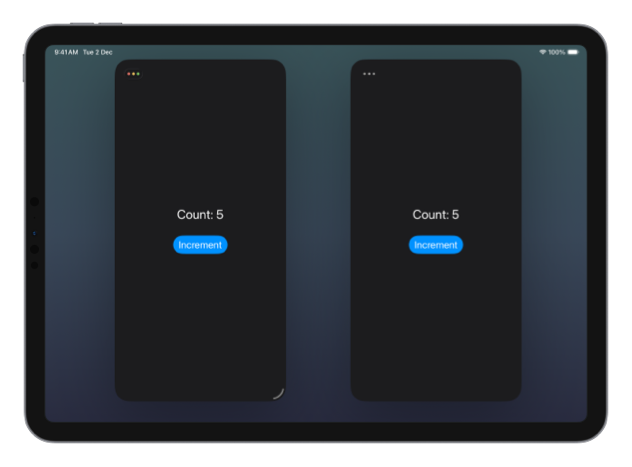
It's important to remember that state initialized in views inside a WindowGroup scene is scoped to that scene. On devices that support multiple scenes, such as iPad or Mac, each window gets its own fresh copy of that state. If we want shared state across all scenes, we can initialize our observable model in the App struct and then pass it down through the environment.
@Observable
class DataModel {
    var count = 0
}

@main
struct ObservableExampleApp: App {
    @State private var dataModel = DataModel()

    var body: some Scene {
        WindowGroup {
            ContentView()
                .environment(dataModel)
        }
    }
}

struct ContentView: View {
    var body: some View {
        CountView()
    }
}

struct CountView: View {
    @Environment(DataModel.self)
    private var dataModel

    var body: some View {
        VStack {
            Text("Count: \(dataModel.count)")

            Button("Increment") {
                dataModel.count += 1
            }
            .buttonStyle(.borderedProminent)
        }
    }
}
This way, each scene will read and write to the same shared state. This is a good choice for application wide data, but not for state that should be scene specific, such as selection or navigation.
Even though the App struct initializer should only run once per application lifecycle, it's best to still annotate the observable model with @State or, at least make it a singleton with a static declaration, to be 100% certain that it will not get reset in any unexpected scenario.
If we want to defer the initialization of the application wide state, we cannot simply assign it in a task() modifier like we did for view state. A task attached to the root view will run once per scene, not once per app launch. To ensure the state is initialized only once, we would need an additional flag or some other guard around the initialization.
To learn more about @Observable in SwiftUI, including when to annotate it with @Bindable and how it differs from ObservableObject, you can read my other post: Using @Observable in SwiftUI views.
If you are looking to build a strong foundation in SwiftUI, my book SwiftUI Fundamentals takes a deep dive into the framework's core principles and APIs to help you understand how it works under the hood and how to use it effectively in your projects. And my more recent book The SwiftUI Way helps you adopt recommended patterns, avoid common pitfalls, and use SwiftUI's native tools appropriately to work with the framework rather than against it.
For more resources on Swift and SwiftUI, check out my other books and book bundles.
Work with SwiftUI. Not against it.$35
A field guide to SwiftUI patterns and anti-patterns
The SwiftUI Way
- Avoid common SwiftUI pitfalls
- Build deeper intuition for the framework
- Gain insights from a former SwiftUI Engineer at Apple
Work with SwiftUI. Not against it.
A field guide to SwiftUI patterns and anti-patterns
The SwiftUI Way