

Set supported platforms in file target membership options in Xcode
When we create a new file in Xcode, it's set to build for all platforms that the app supports by default. If the code in the file uses platform-specific APIs, such as NSDocumentController for macOS, the app won't compile for other platforms like iOS unless we wrap the platform-specific code in #if os(macOS) checks:
import SwiftUI

#if os(macOS)
struct MacDocumentList: View {

    var body: some View {
        List(
            NSDocumentController.shared.recentDocumentURLs,
            id: \.self
        ) { url in
            Text(url.absoluteString)
        }
    }
}
#endif
Alternatively, we can edit the file’s target membership options in Xcode and restrict the file to a specific platform. For instance, we can configure the file to only build for macOS. To do this, we open the file inspector panel in Xcode, select the target membership, and click the pencil icon to edit. From there, we uncheck the "Any Supported Platform" checkbox, choose the platform the file should build for, and click save.
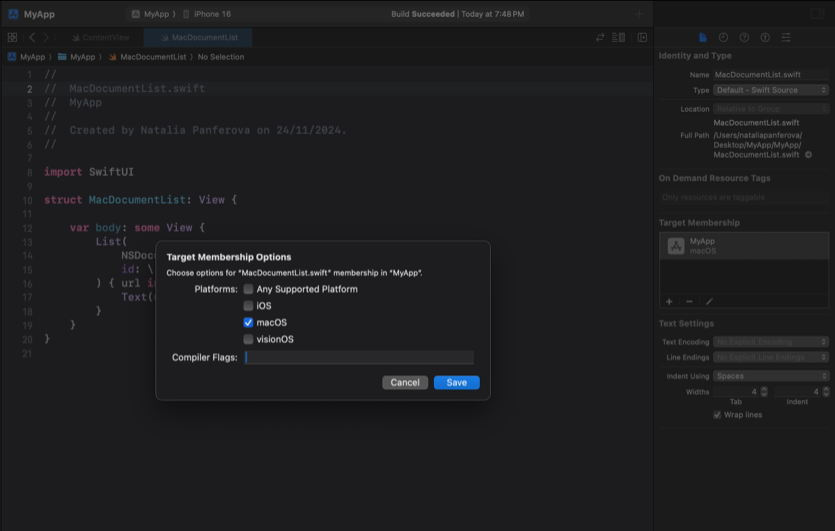
This avoids wrapping the entire file in conditional compilation checks when its contents are specific to one platform.
Note that this feature is only available for files managed by Xcode and it won't work in a Swift package.
If you're an experienced Swift developer looking to learn advanced techniques, check out my book Swift Gems. It dives into topics like optimizing collections, handling strings, and mastering asynchronous programming - perfect for taking your Swift skills to the next level.


Level up your Swift skills!$35
100+ tips to take your Swift code to the next level
Swift Gems
- Advanced Swift techniques for experienced developers bypassing basic tutorials
- Curated, actionable tips ready for immediate integration into any Swift project
- Strategies to improve code quality, structure, and performance across all platforms
Level up your Swift skills!
100+ tips to take your Swift code to the next level
Swift Gems