

Positioning SwiftUI views around the fold on iPhone Duo
In iOS 27.1, SwiftUI can report the reserved regions of a view: parts of its coordinate space taken up by hardware or system elements outside the view's control. Each ReservedRegion has a kind: division for an area that splits the available space, such as the fold on the inner display of iPhone Duo, and occlusion for an area covered by hardware, such as a camera. System components and arrangement views already keep their content clear of the fold, but layout containers such as stacks and grids don't. In this post, we'll look at how to find the fold with the reservedRegions(kind:options:layoutDirectionBehavior:) method on GeometryProxy and position our views around it.
# Laying out content around the active fold
When iPhone Duo is partially folded, the two halves of the inner display meet at an angle, with the fold running vertically or horizontally depending on how the device is held. Text that crosses the fold is harder to read, and controls placed on it are harder to tap.
Scrolling only helps when the fold runs across the scroll direction. A vertical scroll view can move its content past a horizontal fold, but a vertical fold stays over the same part of the content however far people scroll.


Work with SwiftUI. Not against it.$35
A field guide to SwiftUI patterns and anti-patterns
The SwiftUI Way
- Avoid common SwiftUI pitfalls
- Build deeper intuition for the framework
- Gain insights from a former SwiftUI Engineer at Apple
Work with SwiftUI. Not against it.
A field guide to SwiftUI patterns and anti-patterns
The SwiftUI Way
For example, the library in Whio, the EPUB and PDF reader for technical books that I recently released, shows books in a vertically scrolling grid. Here is a basic version of that grid, which doesn't take the fold into account:
ScrollView {
    LazyVGrid(
        columns: [GridItem(.adaptive(minimum: 145), spacing: 24)],
        spacing: 32
    ) {
        ForEach(books) { book in
            BookCover(book: book)
        }
    }
    .padding(24)
}
With the device partially folded, this grid places the third column right on the fold:
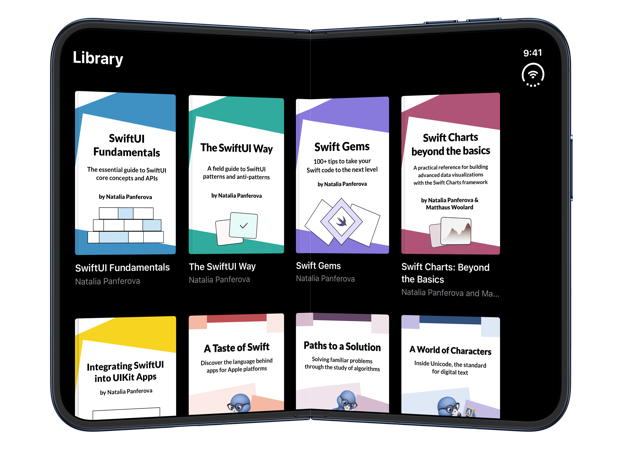
To keep the columns clear of the fold, we need to know where the fold falls within the grid. We can read the fold's position in the onGeometryChange(for:of:action:) modifier, by calling reservedRegions(kind:) on the geometry proxy with the division kind. By default, this method returns only active regions, so the fold is reported only while the device is partially folded.
The region's frame is in the grid's coordinate space and already includes the margins that the system recommends around the fold, so we can use it directly. Since the grid scrolls vertically, it only needs to avoid a vertical fold. We keep the region that is taller than it is wide and store its horizontal bounds, together with the grid's width, in a FoldRegion value:
LazyVGrid(columns: columns, spacing: 32) {
    ForEach(books) { book in
        BookCover(book: book)
    }
}
.onGeometryChange(for: FoldRegion.self) { proxy in
    let fold = proxy.reservedRegions(kind: .division)
        .first { $0.frame.height > $0.frame.width }
    return FoldRegion(
        width: proxy.size.width,
        fold: fold.map { $0.frame.minX...$0.frame.maxX }
    )
} action: { newRegion in
    region = newRegion
}
While the fold is active, we can replace the adaptive columns with four fixed-width columns, two on each side of the fold, and widen the spacing between the second and third columns so that it covers the fold:
private var columns: [GridItem] {
    guard let fold = region.fold else {
        return [GridItem(.adaptive(minimum: 145), spacing: spacing)]
    }

    // Size two columns to fit the narrower side of the fold,
    // and compute the spacing that steps over it
    let (columnWidth, gap) = columnMetrics(around: fold)

    return [
        GridItem(.fixed(columnWidth), spacing: spacing),
        GridItem(.fixed(columnWidth), spacing: gap),
        GridItem(.fixed(columnWidth), spacing: spacing),
        GridItem(.fixed(columnWidth))
    ]
}
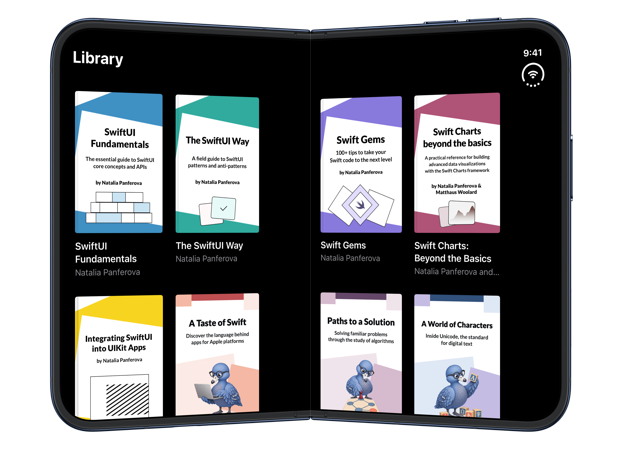
The column width comes from the narrower side of the fold, so all four columns are equal, while spacing stays at the 24 points used in the original grid. As a result, the fold falls between the covers instead of across them:
# Detecting the fold while it's inactive
When the device is open flat, the fold is still part of the display, but it's inactive and doesn't divide the layout. Because we only request active regions, the fold isn't reported until the device is partially folded, so any layout decision based on the fold changes at that moment.
This often affects the number of columns in a grid. If a grid fits its columns to the available width while the device is flat and arranges them around the fold once it's active, the number of columns can change as the device folds, and the content moves to different positions.
Deepen your understanding of SwiftUI!$35
The essential guide to SwiftUI core concepts and APIs
SwiftUI Fundamentals
- Explore the key APIs and design patterns that form the foundation of SwiftUI
- Develop a deep, practical understanding of how SwiftUI works under the hood
- Learn from a former Apple engineer who worked on widely used SwiftUI APIs
Deepen your understanding of SwiftUI!
The essential guide to SwiftUI core concepts and APIs
SwiftUI Fundamentals
For example, the library grid in Whio scales its minimum column width with the text size:
@ScaledMetric private var minimumWidth = 145
At the default text size, four columns fit on the open inner display. At smaller text sizes, the grid fits five columns while the device is flat:
Once the device is partially folded, the grid switches to four columns around the fold, and every cover after the first two moves to a different position:
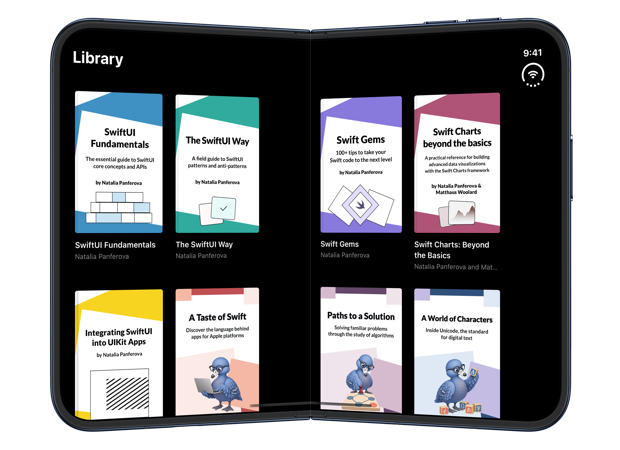
To keep the number of columns stable and avoid too much movement as the device folds, we can read the fold even while it's inactive. With the includeInactive option, reservedRegions(kind:options:) returns the fold when the device is flat as well, and its isActive property tells us whether it currently divides the layout. We can store this value in FoldRegion together with the fold's bounds:
.onGeometryChange(for: FoldRegion.self) { proxy in
    let fold = proxy.reservedRegions(kind: .division, options: .includeInactive)
        .first { $0.frame.height > $0.frame.width }
    return FoldRegion(
        width: proxy.size.width,
        fold: fold.map { $0.frame.minX...$0.frame.maxX },
        isActive: fold?.isActive ?? false
    )
} action: { newRegion in
    region = newRegion
}
While the fold is inactive, the grid can use an even number of flexible columns. That way, when the fold becomes active, half of the columns go on each side of it, and the column count doesn't change:
private var columns: [GridItem] {
    guard let fold = region.fold else {
        return [GridItem(.adaptive(minimum: minimumWidth), spacing: spacing)]
    }

    guard region.isActive else {
        return Array(
            repeating: GridItem(.flexible(), spacing: spacing),
            count: evenColumnCount
        )
    }

    // Two columns on each side of the fold, as before
    ...
}
The evenColumnCount property divides the grid's width by the minimum column width and rounds the result down to an even number. At smaller text sizes, the flat library now shows four columns as well:
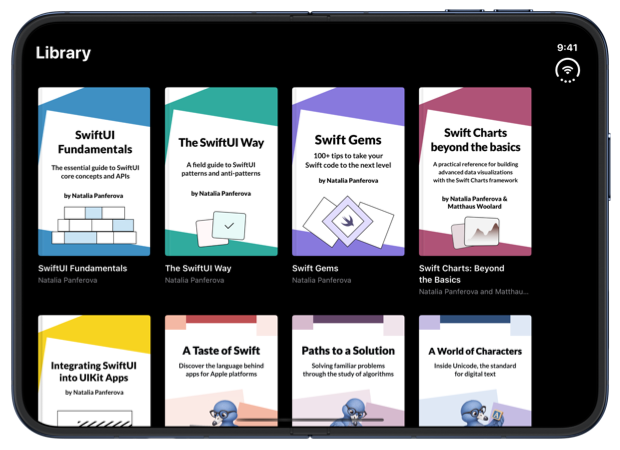
When the device is partially folded, the same four columns move apart to make room for the fold, and each cover stays in its column:
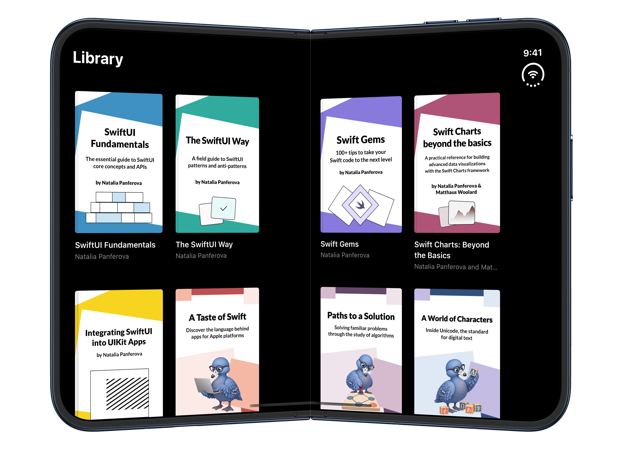
The approach isn't limited to grids. Any layout that positions its own content can read reserved regions in the same way, and Apple's documentation shows a custom Layout that receives them and positions its subviews away from them. Reserved region frames also follow the layout direction by default, so the columns we computed stay clear of the fold in right-to-left languages without any changes.
If you are looking to understand how SwiftUI sizes and positions views, my book SwiftUI Fundamentals takes a deep dive into the framework's layout system and other core principles to help you understand how it works under the hood and how to use it effectively in your projects. And if you are working with a coding agent, our Mac app SwiftFairy reviews the layout code it writes locally, using its SwiftUI Layout & Resizability guidance to flag views that won't adapt as the device folds, the screen rotates, or the content changes size.
For more resources on Swift and SwiftUI, check out my other books and book bundles.
Our Swift expertise, on call for your agent
On-device Swift and SwiftUI reviews with fix guidance
 Proper SwiftUI
 SwiftUI Layout & Resizability
 Performant Swift Charts
 Modern Swift