

Nil Coalescing Newsletter - December 2025
Hi there,
I hope you are enjoying the end of the year and finding some time to slow down, reflect, and look ahead to what's next.
This month marks a small milestone for this newsletter. I started it back in January, and this is the twelfth issue. Thank you for following along and supporting my work throughout the year.
This year has been busy and rewarding. I published a new book, SwiftUI Fundamentals, launched a YouTube channel, and Matt and I continued sharing what we've been learning through our blog posts.
As 2025 comes to a close, I thought this would be a good moment to look back and revisit some of the most popular topics from the Nil Coalescing blog from this year and also talk about next year's plans and goals.
I'm also running a special festive discount on my books just for newsletter readers. If you are looking for some holiday reading to deepen your understanding of SwiftUI or sharpen your Swift language skills, you can find the discount coupon in the "Book discounts" section at the end of this issue.
Nil Coalescing blog: this year in review
iOS 26 and Liquid Glass
By far the most popular posts this year were those covering new iOS 26 features, the introduction of the Liquid Glass design language, and the ways we can take advantage of this new design paradigm in SwiftUI apps.
Presenting Liquid Glass sheets in SwiftUI on iOS 26: Learn how to leverage the new glass appearance for partial sheets in iOS 26, and set up morphing transitions for sheets presented from toolbar buttons using SwiftUI APIs.
SwiftUI Liquid Glass sheets with NavigationStack and Form: Configure the NavigationStack and Form background in SwiftUI so partial height sheets keep the translucent Liquid Glass appearance on iOS 26.
SwiftUI Search Enhancements in iOS and iPadOS 26: Take advantage of the updated search placement and behavior in iOS 26, and implement toolbar and tab bar search patterns that adapt across devices and integrate with the new Liquid Glass design.
Corner concentricity in SwiftUI on iOS 26: Make your views and controls fit perfectly within their containers using new SwiftUI APIs in iOS 26 such as the ConcentricRectangle shape and the containerShape() view modifier.
Advanced SwiftUI
Beyond new platform features and improvements, many of the most-read posts this year focused on more advanced SwiftUI topics, such as scroll performance and scroll behavior customization, visual effects, animations, and other techniques for building more complex and polished interfaces.
Designing a custom lazy list in SwiftUI with better performance: Implement a high-performance lazy scrolling list in SwiftUI by efficiently reusing views for smooth scrolling with large datasets.
ScrollView snapping in SwiftUI: Explore SwiftUI APIs for customizing scroll behavior, including paging and view-aligned snapping, and learn what to watch out for to avoid unexpected results.
Stretchy header in SwiftUI with visualEffect(): Build a stretchy image header in SwiftUI using the visualEffect() modifier, scaling the image on pull-down without tracking scroll offset or modifying its frame.
Animating SF Symbols in SwiftUI: Add symbol effect animations and transitions to symbol images in SwiftUI to handle icon state changes without custom drawing or animation logic.
Mesh gradients in SwiftUI: Explore ways to create and customize mesh gradients in SwiftUI, including color adjustments, finer control with Bezier points, and color position animations to add variety and emphasis to your design.
macOS app development
This year also included a number of deep dives into macOS app development, focusing on building native desktop experiences with SwiftUI and system frameworks. These posts cover common patterns for macOS apps, from menu bar utilities to system integrations, and explore how to take advantage of platform-specific APIs to create apps that feel at home on macOS.
Build a macOS menu bar utility in SwiftUI: Learn how to build a macOS menu bar app in SwiftUI using MenuBarExtra, customize its icon, hide it from the Dock, and add essential features like a quit option.
Customizing macOS window background in SwiftUI: Apply a translucent background to macOS windows using SwiftUI APIs, and adjust the toolbar background and title visibility to customize the window's appearance.
Provide macOS system-wide services from your app: Extend your app's functionality to the entire macOS system by implementing services that users can access from the context menu or the Services menu in other apps.
Add launch at login setting to a macOS app: Register your macOS app as a login item using SMAppService.
Swift language features
Alongside framework updates and UI work, a number of our blog posts this year focused on the Swift language itself. These articles explore core language features, and newer additions to Swift that help write safer, more expressive, and more performant code.
Codable conformance for Swift enums: Learn how to add Codable conformance to Swift enums, including automatic synthesis, customizations, and fully manual implementations for complex cases.
Capture UUID values with regex in Swift: Build reusable, type-safe components for extracting and validating UUID values using Swift's RegexBuilder framework.
Noncopyable types in Swift: Explore noncopyable types in Swift and learn how they enforce stricter ownership rules to avoid unintended errors and resource conflicts.
Method dispatch mechanisms in Swift: static and dynamic dispatch: Dive into how static and dynamic dispatch work in Swift, how they affect performance, and how to control method resolution to write faster, more efficient code.
2026 plans and goals
Conferences
In the beginning of 2026 Matt and I will be attending two conferences: iOS Conf SG and ARCtic Conference. Both conferences have already announced their speaker lineups and session schedules, and tickets are still available if you are looking for an iOS conference to attend next year.
I'll be speaking at both events. At iOS Conf SG, I'll be giving a talk on the SwiftUI mindset — focusing on how to work with the framework rather than against it, and how to avoid some of the most common pitfalls when building SwiftUI apps.
At ARCtic Conference, I'll be sharing a talk on lesser-known Swift language features that can make everyday code more readable, maintainable, and expressive.
I may attend a few more conferences later in the year, but these two are already confirmed. I hope to see some of you in person at one of them.
Books
I'm currently working on two new SwiftUI books, focusing on different aspects of the framework and designed as follow-ups to "SwiftUI Fundamentals".
The first book is planned for release in March. I originally hoped to publish it earlier in the year, but had to postpone the release due to conference travel. The second book will follow later in 2026.
I'm really looking forward to sharing more details in the new year, so stay tuned!
Book discounts
If you are thinking about getting one of my Swift or SwiftUI books, or a book bundle, you can use the discount code NY2026 for 25% off your purchase at checkout until January 10. Take a look at our books website for all the available books and bundle options.
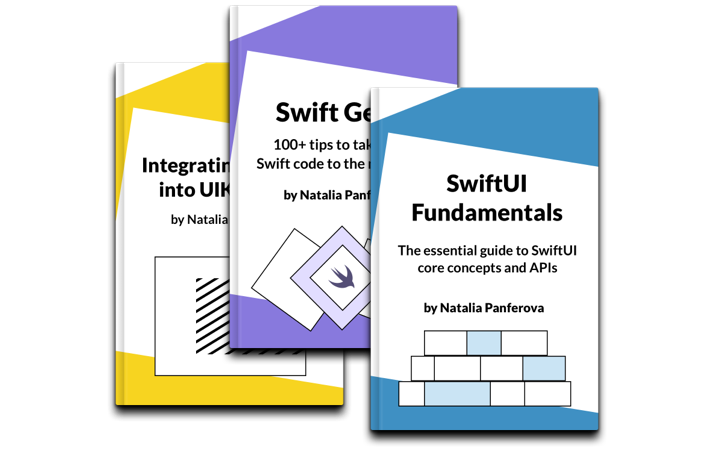
Books by Natalia Panferova
- SwiftUI Fundamentals: Develop a deep understanding of SwiftUI's core APIs and underlying mechanisms to use the framework effectively in your projects.
- Swift Gems: Enhance your Swift code with over 100 concise tips designed for experienced developers looking to refine their skills across all platforms.
- Integrating SwiftUI into UIKit Apps: Discover practical techniques to smoothly integrate SwiftUI into existing UIKit projects.
All of my books have been recently refreshed for iOS 26 and Swift 6.2, and all purchases include free lifetime updates.
Thank you for your continued support. I wish you a very happy new year and look forward to connecting again in 2026.